
How to Transfer a Domain to Another Registrar (EPP Code Guide)
Moving a domain to a new registrar is simpler than it sounds. Learn what an EPP code is, the six steps of a .com transfer, how long it takes, what blocks transfers and how to keep your site and email online throughout.

Table of contents
- What is a domain transfer?
- Why transfer a domain?
- What is an EPP code?
- How to transfer a domain to another registrar: step by step
- 1. Check eligibility
- 2. Update your contact email
- 3. Unlock the domain
- 4. Get the EPP code
- 5. Start the transfer at the new registrar
- 6. Approve and wait
- Country-code domains follow their own rules
- Will my website go down during a domain transfer?
- Why transfers fail or get stuck
- Post-transfer checklist
- Video: how to transfer a domain
- Frequently asked questions
- How long does a domain transfer take?
- Will my website or email go down during a transfer?
- Where do I find my EPP code?
- How much does it cost to transfer a domain?
- Why can't I transfer a newly registered domain?
- Conclusion
Maybe your domain was registered years ago with a company whose dashboard is clumsy, whose renewal prices keep rising, or whose support never answers. Maybe the person who registered it has left. Whatever the reason, you can transfer your domain to another registrar, and if you follow the rules, your website and email will not go down for a minute.
This guide explains what a domain transfer actually is, what an EPP or authorization code does, the exact steps for transferring .com, .net and other generic domains, how long it takes, what can block a transfer and what to check once it is done.
What is a domain transfer?
A domain transfer moves the management of a domain name from your current registrar to a new one. Your ownership, your website files and your hosting do not change; only the company where you renew the domain and manage settings such as nameservers changes. As long as you leave the nameservers alone, the site keeps loading from the same hosting throughout the transfer.
Don't confuse it with two similar tasks:
- Moving hosting: copying your files and database to a different server. We cover that in how to move your website to a new host.
- Changing the registrant: handing ownership of the domain to another person or company, for example when you sell it.
Why transfer a domain?
- Consolidation: your domains are spread across several companies and renewal dates are hard to track.
- Price: your current registrar's renewal price is well above the market.
- Control: the domain sits in a former developer's or employee's account and you want it in your own.
- Features: better DNS management, registrar lock, two-factor login, auto-renew and responsive support.
What is an EPP code?
An EPP code (also called an auth code, authorization code or transfer key) is a unique password your current registrar issues for a domain. The new registrar uses it to prove that the transfer request really comes from the domain's owner. Treat it like a password and enter it only at the registrar you are moving to.
How to transfer a domain to another registrar: step by step
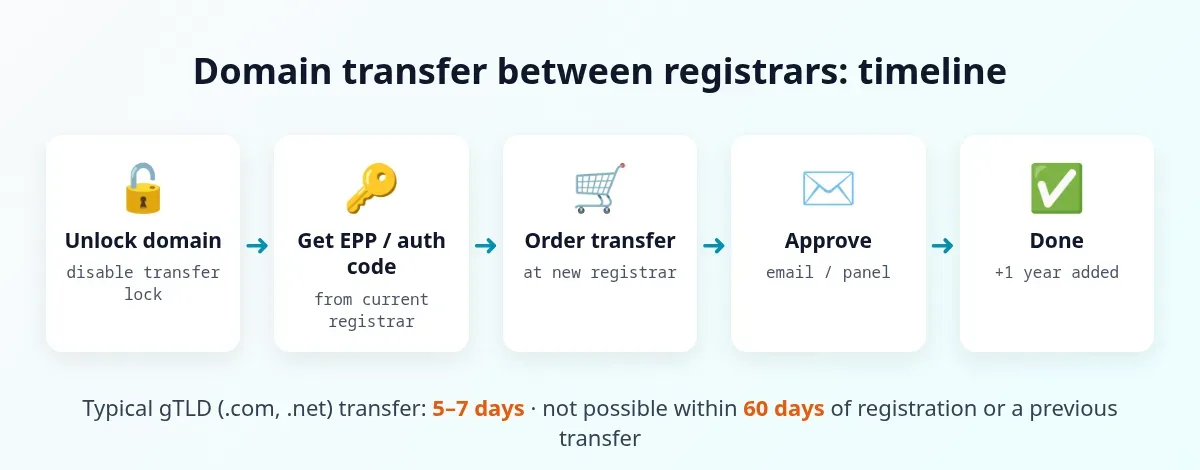
1. Check eligibility
Under ICANN rules, a generic domain usually cannot be transferred within 60 days of its registration or a previous transfer. The domain must not be expired, suspended or in a dispute. If it is close to expiry, start a few weeks before the expiration date.
2. Update your contact email
Make sure the registrant email in your domain's contact (WHOIS) details is an address you can access, because transfer notices and any approval requests go there. If your registrar recommends it, temporarily turn off privacy protection.
3. Unlock the domain
Most domains have a "transfer lock" or "registrar lock" enabled for security. Turn it off in your current registrar's dashboard.
4. Get the EPP code
Copy the code from the dashboard or request it from support. Registrars are required to provide it to the domain holder promptly.
5. Start the transfer at the new registrar
Enter the domain and the EPP code in the new registrar's transfer page and pay the transfer fee. For most generic extensions, the fee includes a one-year renewal that is added to your current expiry date, so you do not lose the time you already paid for.
6. Approve and wait
Confirm any approval email you receive. A transfer of a .com or .net domain typically completes within 5 to 7 days, and your current registrar may let you approve it early to speed things up. When it is done, check the nameservers and DNS records in the new dashboard and turn the transfer lock back on.
Country-code domains follow their own rules
Country-code extensions such as .uk, .de or .ir are run by national registries, and their transfer process can differ. A .uk domain, for example, is moved by changing its registrar tag rather than with an EPP code, and some registries do not add a year on transfer. Always check your registry's current rules or ask the new registrar before you start.
Will my website go down during a domain transfer?
Not if the nameservers and DNS records stay the same. In most transfers the nameservers are carried over and the site and email keep working without interruption. The exception is when your DNS zone is hosted by the old registrar itself: in that case, note every record (A, MX, TXT, CNAME) before you start and recreate them at the new registrar, or point the domain to your hosting's nameservers. Because the domain and URLs do not change, a transfer has no effect on SEO.
Why transfers fail or get stuck
| Problem | Fix |
|---|---|
| Less than 60 days since registration or last transfer | Wait until the period ends |
| Domain is locked | Disable the transfer lock |
| Wrong or expired EPP code | Request a fresh code and paste it without extra spaces |
| Domain expired or in redemption | Renew or restore it first, then transfer |
| No approval email | Update the WHOIS email and check spam |
| Registrant details don't match | Correct the contact details at the current registrar |
Post-transfer checklist
- Check the WHOIS details and the new expiry date.
- Review the nameservers and DNS records, especially email MX records.
- Turn on the transfer lock, two-factor login and auto-renew.
- Load the site over HTTPS and confirm the SSL certificate is valid.
- Send and receive a test email if you use business email on the domain.
Video: how to transfer a domain
This short step-by-step guide shows the process in a real registrar dashboard:
Frequently asked questions
How long does a domain transfer take?
A .com or .net transfer typically completes within 5 to 7 days. It can finish sooner if your current registrar lets you approve the transfer early.
Will my website or email go down during a transfer?
Not if you keep the same nameservers and DNS records. Your site and email continue to run on the same hosting throughout.
Where do I find my EPP code?
In your current registrar's domain management dashboard, or by asking their support. Some country-code domains, such as .uk, use a different method instead of an EPP code.
How much does it cost to transfer a domain?
For most generic extensions the fee is about the same as a one-year renewal, and that year is added to your domain's expiry date. Exact prices depend on the new registrar.
Why can't I transfer a newly registered domain?
ICANN rules generally prevent transfers within 60 days of registration or a previous transfer.
Conclusion
Transferring a generic domain comes down to checking the 60-day rule, updating your contact email, unlocking the domain, getting the EPP code, then starting and approving the transfer at the new registrar. Leave the nameservers untouched and your site and email will stay online the whole time.
Still choosing a name? See how to choose a domain name, and for the hosting side read how to choose web hosting. If you'd like help moving a domain, connecting it to hosting or launching a site, the IlyaWeb support team is ready to help.
Featured image: illustration of a domain moving between two registrars, created for IlyaWeb.