
How to Choose a Domain Name: 12 Tips for the Perfect Website Name
Your domain name stays with your business for years, and changing it is costly. These 12 practical tips cover length, the radio test, extensions, trademarks and SEO, plus what to do after you register.

Table of contents
- What is a domain name and what are its parts?
- Why your domain name matters
- 12 tips for choosing the right domain name
- 1. Keep it short and simple
- 2. Pass the "radio test"
- 3. Avoid numbers and hyphens
- 4. Build a brand, not a keyword string
- 5. Pick an extension that matches your audience
- 6. Check trademarks
- 7. Match your social handles
- 8. Leave room to grow
- 9. Check for unintended words and meanings
- 10. Register common variations
- 11. Research the domain's history
- 12. Act quickly
- Do keywords in a domain help SEO?
- What if the domain you want is taken?
- After choosing: how to register and set up your domain
- Quick domain name checklist
- Video: how to choose a perfect domain name
- Frequently asked questions
- Is .com still the best extension?
- How much does a domain cost?
- How many years should I register for?
- What happens if my domain expires?
- Can I change my domain later?
- Should I buy a premium domain?
- Conclusion
Your domain name is often the first thing people see of your business: on a business card, in an Instagram bio, in your email signature and in Google results. Yet many owners leave choosing a domain name until the last minute and register the first available option. The result is usually a long name full of hyphens, or one nobody can spell. Changing it a few years later is painful: you need redirects, new email addresses, reprinted materials, and you risk losing some of the search visibility you have built.
This guide explains how a domain name is structured, what makes a good one, whether keywords in the domain still help SEO, and what to do when the name you want is already taken. At the end you will find a quick checklist and answers to the most common questions.
What is a domain name and what are its parts?
A domain name is the human-friendly address of your website, such as ilyaweb.com. Computers find each other by numeric IP addresses, and the Domain Name System (DNS) translates your name into the IP address of the server that hosts your site. The domain is your address; the hosting is the house where your files actually live.
Every domain has two main parts:
- Second-level domain (SLD): the part you choose, usually your brand, for example
ilyaweb. - Top-level domain (TLD): the extension after the last dot, such as
.com,.net,.org, a country code like.ukor.de, or a newer extension like.shopor.app.
Anything in front, such as www., shop. or blog., is a subdomain. You create subdomains yourself in your hosting control panel or DNS settings at no extra cost; our guide What is cPanel? shows where these settings live.

Strictly speaking, you never buy a domain outright. You register the right to use it for a period, usually one to ten years, through a registrar, and you must renew it on time to keep it.
Why your domain name matters
- Trust: visitors are wary of long, odd-looking addresses or unfamiliar extensions, especially when they are about to pay or share personal details.
- Direct traffic: a memorable name lets happy customers type it straight in instead of searching and possibly clicking a competitor.
- Professional email: addresses like
hello@yourbrand.comare built on your domain. The shorter the domain, the easier it is to read an email address over the phone. - Switching is expensive: a new domain means 301 redirects for every page, updated ads and print, and a period of reduced traffic while search engines catch up.
12 tips for choosing the right domain name
1. Keep it short and simple
Short names are easier to type, harder to misspell and fit better on logos and signs. Technically a label can be up to 63 characters, but in practice aim for roughly 6 to 15 characters and one or two words. If you have to spell your domain every time you say it, it is too long or too clever.
2. Pass the "radio test"
Say the name out loud to three people and ask them to write it down. If all three spell it the way you do, you are fine. Watch out for homophones (for/four, to/two), double letters at word boundaries (expertsexchange) and creative spellings like kwik for quick.
3. Avoid numbers and hyphens
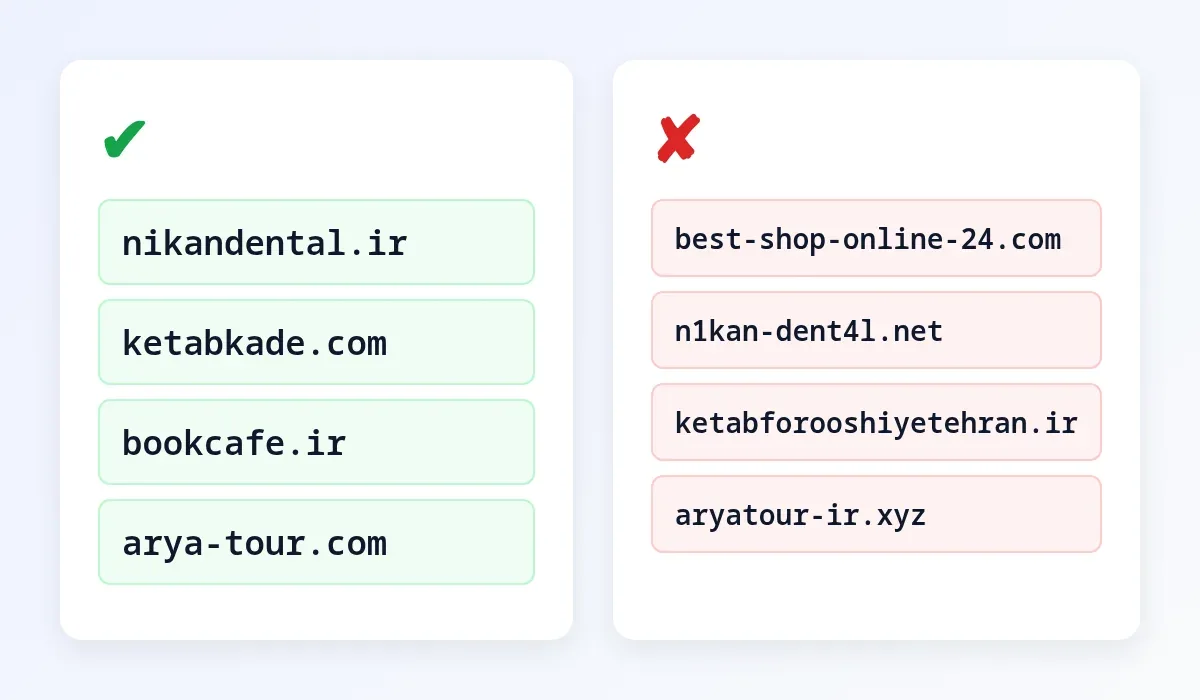
best-shop-24.com turns into "best, dash, shop, dash, two four" on the phone, and people will not know whether to type "24" or "twenty-four". A single hyphen is acceptable only when two words are genuinely hard to read without it.
4. Build a brand, not a keyword string
Exact-match domains such as cheap-phones-online.com look like temporary affiliate sites and are hard to build a brand around. Google stopped giving special weight to exact-match domains many years ago. A distinctive brandable name, optionally combined with one short descriptive word (nikandental.com), is easier to remember and to defend.
5. Pick an extension that matches your audience
.com is still the most recognised and trusted extension worldwide. If you serve one country, its country-code TLD (such as .co.uk, .de or .ca) signals local relevance and can build trust. Newer extensions like .shop, .online or .xyz are cheaper but less familiar to everyday users, and some are heavily used by spammers.
6. Check trademarks
Make sure your name is not someone else's registered trademark. Registering a domain that infringes a brand can lead to a dispute (for example under ICANN's UDRP policy) and the loss of the domain. Search Google, social networks, your national trademark office and the WIPO Global Brand Database before you buy.
7. Match your social handles
Consistency matters. Check that the same name is free on Instagram, X, LinkedIn, YouTube or TikTok, wherever your customers are. A matching handle makes you easier to find and harder to impersonate.
8. Leave room to grow
bostonshoes.com becomes awkward the day you start selling bags or open a store in another city. Choose a name that still makes sense as your business evolves.
9. Check for unintended words and meanings
Words run together can create unfortunate new words. Write the domain in lowercase and read it slowly. If you sell internationally, check that the name does not mean something embarrassing in your target languages.
10. Register common variations
If budget allows, register the main alternative extension and the most common typos, and redirect them to your primary domain. This protects your brand and catches visitors who mistype.
11. Research the domain's history
Previously used domains may carry baggage such as spam history or a manual penalty. Look the name up on the Wayback Machine (archive.org) to see what used to be there, and be cautious if it hosted spam or adult content.
12. Act quickly
Good names go fast. Once you have one that ticks every box, register it. A standard domain costs little compared to its long-term value.
Do keywords in a domain help SEO?
Not in any meaningful way. The domain name is one small signal among hundreds, and its weight has dropped sharply. Rankings come from useful content, speed, good user experience, quality backlinks and trust. A strong brand name helps indirectly: people remember it, search for it by name and are more likely to click your result when they recognise it. Your hosting matters more than your domain for performance; see How to Choose Web Hosting: 10 Things to Check.
What if the domain you want is taken?
- Try another extension: if
.comis gone but your country code is free and your market is local, that can work well. Make sure the other owner is not a direct competitor. - Add a short word: prefixes or suffixes like get, try, hq, app or your industry (yourbrandstudio) are often available.
- Watch the expiry date: a WHOIS or RDAP lookup (for example on lookup.icann.org) shows when the domain expires. Some are not renewed and become available after the grace and redemption periods.
- Contact the owner: unused domains are sometimes for sale. Use an escrow service for the payment and transfer.
- Rethink the name: sometimes the best move is a fresh name that is free and meets every criterion.
After choosing: how to register and set up your domain
- Use a reputable, ICANN-accredited registrar with transparent renewal prices.
- Register it in your own or your company's name, never in the name of a web designer or employee who might leave.
- Turn on auto-renew or register for several years, and keep the contact email up to date.
- Point it to your hosting by setting the host's nameservers. Not sure whether you need Linux or Windows hosting? Read Linux vs Windows Hosting.
- Enable SSL and professional email so your site loads over HTTPS and you send email from your own domain from day one.
Quick domain name checklist
| Criterion | Question to ask |
|---|---|
| Length | Is it under about 15 characters and easy to type? |
| Spelling | Will someone who hears it write it correctly? |
| Numbers and hyphens | Is it free of numbers, with no more than one hyphen? |
| Brand | Is it distinctive and not tied to one product or city? |
| Extension | Does the TLD fit your market (global or local)? |
| Legal | Is it clear of existing trademarks? |
| Social | Is the same handle free on your key networks? |
| History | Is the domain free of a spammy past? |
| Ownership | Is it registered in your own name? |
Video: how to choose a perfect domain name
Prefer to watch? This short video covers the same principles with examples:
Frequently asked questions
Is .com still the best extension?
For a global audience, usually yes, because it is the default people type. For a business serving a single country, the local country code can be just as good or better.
How much does a domain cost?
Most standard extensions cost roughly 10 to 20 US dollars a year. Always check the renewal price, as some extensions are discounted in year one and much more expensive afterwards.
How many years should I register for?
If you are confident in the name, register for several years or enable auto-renew. It protects you against forgetting a renewal and losing the domain.
What happens if my domain expires?
Your website and email stop working. Most registrars offer a grace period and then a redemption period with a fee, after which the domain is released and anyone can register it.
Can I change my domain later?
Yes, but you must 301-redirect every old URL to its new address and use the Change of Address tool in Google Search Console. Expect a temporary dip in traffic even when it is done correctly.
Should I buy a premium domain?
Only if the name is truly central to your brand and the price is justified. A clear, available name you can build on is usually a better investment than an expensive short one.
Conclusion
A good domain name is short, easy to say and spell, free of numbers and extra hyphens, brandable and on an extension that fits your audience, and it is registered in your own name. Run the radio test, check trademarks and social handles, and protect the main variations. A few hours of thought now saves the cost and hassle of a domain change later.
Need help choosing a name, registering it, or connecting it to fast, reliable hosting with SSL and business email? The IlyaWeb team can set everything up so your site launches on the right foundation.
Featured image: typing on a laptop, photo by Simon Hattinga Verschure (Unsplash), Wikimedia Commons, CC0; address bar added by IlyaWeb.