
Restaurant Website Guide: Must-Have Features, QR Menus and Online Ordering
What should a restaurant or café website actually do? This guide covers the must-have features, digital and QR code menus, online ordering and table reservations, Google Maps and local SEO, mobile speed, what drives the cost and the most common mistakes.

Table of contents
- Why does a restaurant or café need its own website?
- Essential features of a restaurant website
- 1. A full menu with prices, as real text (not a PDF)
- 2. Address, map and opening hours
- 3. Tap-to-call and clear calls to action
- 4. Real photos
- 5. Reservations, online ordering, or both
- 6. Your story and reviews
- What is a digital menu and how do QR code menus work?
- Online ordering: your own site or delivery apps?
- Online table reservations
- Google Maps and local SEO for restaurants
- Photos and mobile speed
- Which features fit which type of restaurant?
- What does a restaurant website cost?
- Common restaurant website mistakes
- Video: what the best restaurant websites do differently
- Frequently asked questions
- What should a restaurant website include?
- Should my QR code menu be on my own website?
- Do I need a website if I am on delivery apps and social media?
- Are PDF menus bad for SEO?
- How do I get my restaurant to rank on Google Maps?
- How much does a restaurant website cost?
- Summary
Most diners decide where to eat on their phone long before they walk through the door. They search the restaurant's name or "pizza near me", glance at the photos, check the menu and prices, and look for opening hours. If that information is missing, buried in a PDF or only available as an old Instagram post, many of them simply pick the next result.
This guide explains what a restaurant website actually needs to do: the features that are essential and the ones that can wait, how a digital or QR code menu works, how to handle online ordering and table reservations, and how to show up on Google Maps and in local search. The goal is to help you know exactly what you want before you hire anyone to build it.
Why does a restaurant or café need its own website?
If you already have social media pages and are listed on delivery apps, a website may look optional. The difference is ownership. Your website is the one channel where you set the rules: no platform decides how your menu looks, no commission is taken from direct orders, and search engines treat it as the official source of information about your business.
- Visibility in search: Google answers queries like "brunch café downtown" with a mix of map results and websites. A good site strengthens both.
- A menu that is always current: change a price once in your admin panel and it updates on the site and on every QR code menu at your tables. No reprinting.
- Direct orders and bookings: part of your orders and reservations comes straight to you, along with the customer relationship.
- Trust: for private events, group bookings and catering, people almost always check your website first.
Essential features of a restaurant website
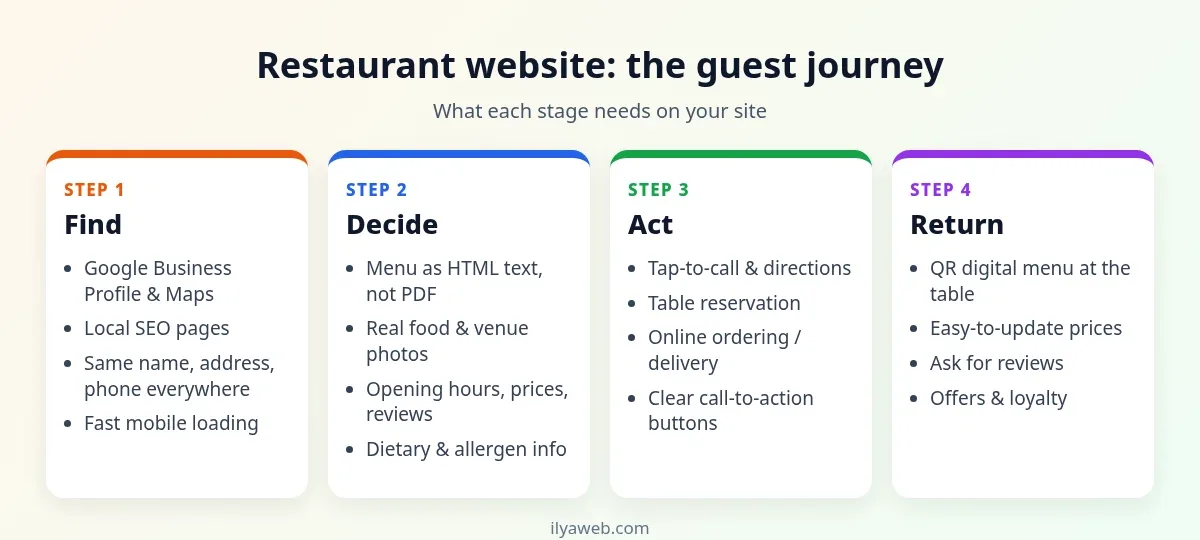
A great restaurant site does not have to be big. It has to answer a hungry visitor's questions fast. The diagram below follows the guest journey, from finding you to coming back, and what your site needs at each stage:
1. A full menu with prices, as real text (not a PDF)
The menu is the most visited page on almost every restaurant website. Publish it as HTML text organised by category, with a short description, the price and ideally a real photo for each dish. Add dietary and allergen labels (vegetarian, vegan, gluten-free, nuts). PDF menus and scanned images are slow and hard to read on a phone, and search engines understand them poorly.
2. Address, map and opening hours
Show your full address, an embedded map, a "Get directions" button and accurate opening hours, including holiday hours, on the contact page and in the footer of every page. Mention parking or the nearest public transport if it helps people reach you.
3. Tap-to-call and clear calls to action
On mobile your phone number must be a tappable tel: link. A sticky "Call", "Book a table" or "Order online" button at the bottom of the screen is usually the most clicked element on the site.
4. Real photos
Photos of your actual dishes, dining room, terrace and exterior sell better than any copy. Generic stock photos of food that appear on dozens of other sites quietly undermine trust.
5. Reservations, online ordering, or both
Which one you need depends on your business model. Both are covered in detail below.
6. Your story and reviews
The chef, the sourcing, the family history: this is what sets you apart from the place next door. Real reviews, or links to your Google reviews, add social proof.
What is a digital menu and how do QR code menus work?
A digital menu is an online version of your menu designed for phones. A QR code menu is the same thing, opened by scanning a code on the table with the phone camera, with no app to install. Its main advantage is that any change to prices or availability is live for everyone instantly.
- Host it on your own domain. If the menu lives on a third-party service and you switch providers one day, every printed code stops working. An address like
yourrestaurant.com/menuis better for SEO and always stays under your control. If you are still choosing a name, see our guide on how to choose a domain name. - Keep it light. Guests open it on mobile data. Compress photos and use modern formats like WebP so the menu loads in a second or two.
- Keep some printed menus. Not every guest has a charged phone or wants to use it at dinner.
- Test before printing. Scan the code with several phones under your dining room's actual lighting.
A QR menu can be view-only, or it can let guests order and even pay from the table. A view-only menu is simpler, cheaper and enough for most cafés.
Online ordering: your own site or delivery apps?
Third-party delivery platforms bring new customers, but they charge a commission on each order and keep most of the customer data. Ordering through your own website avoids both, although you have to drive that traffic yourself. For many restaurants the sensible answer is a mix: marketplaces for discovery, your own ordering page for regulars who are happy to order direct.
If you add online ordering with payment, plan for:
- A payment provider integration and clear refund rules.
- Delivery zones, fees and minimum order values (or pickup only).
- Real-time availability, so a sold-out dish disappears from the menu.
- A reliable alert in the kitchen: tablet, ticket printer, email or SMS.
Online table reservations
For fine dining, busy weekend cafés and venues that host events, online booking reduces phone calls and eliminates double bookings. You can use a dedicated booking service or a booking module on your own site. A good system captures party size, date and time, seating preference and notes, sends confirmations and reminders, and manages capacity per time slot. Google also lets supported booking partners add a reservation button to your Business Profile.
Google Maps and local SEO for restaurants
For restaurants, local SEO is the part of SEO that matters most: showing up when someone nearby is looking for food.
- Google Business Profile: claim and verify your listing, choose the most accurate primary category, and complete hours, photos, menu link, website and attributes.
- Consistent NAP: your name, address and phone number should match exactly on your site, Google, Apple Maps, Tripadvisor, Yelp and social profiles.
- Reviews: ask happy guests for reviews and reply to every review, positive or negative, politely and promptly.
- Restaurant schema: structured data of type
Restaurantlets you describe your address, hours, cuisine, price range and menu URL in a format search engines can read. - One page per location: each branch gets its own page with address, map, hours and photos.
Photos and mobile speed
Restaurant sites are photo-heavy, and oversized images are the most common reason they feel slow on phones. Resize and compress images before uploading, serve WebP, lazy-load images further down the page, avoid autoplaying background videos and choose solid hosting close to your guests. Our guide on how to choose web hosting covers what to look for.
Which features fit which type of restaurant?
| Business type | Must-have | Nice to add later |
|---|---|---|
| Small café | QR digital menu, address and map, hours, photo gallery | Weekend reservations, events page |
| Fast food and pizza | Menu with prices, online ordering, delivery zones, tap-to-call | Online payment, promo codes, reorder history |
| Fine dining | Menu, table booking, venue gallery, private events page | Table or area selection, pre-ordering for events |
| Multi-location chain | A page per location, shared menu with per-branch prices | Ordering with branch selection, loyalty program |
| Catering | Services, sample menus, enquiry form | Recurring orders, corporate client portal |
What does a restaurant website cost?
There is no single price, and any figure quoted without knowing your needs is misleading. The main cost drivers are:
- Scope: a brochure site with a menu is the simplest; ordering, payments, reservations and multiple locations each add work.
- Platform: a CMS such as WordPress is usually enough for a showcase and menu; high-volume ordering or POS integration often justifies custom development.
- Content: professional food photography and menu copywriting cost extra but directly affect sales.
- Integrations: payment gateway, SMS, POS or accounting software.
- Running costs: hosting, domain renewal, support and updates.
If you want a scoped estimate for your own restaurant, café or chain, see our restaurant website design and development service, which explains the features, process and how to get in touch.
Common restaurant website mistakes
- PDF or image-only menus that are unreadable on mobile and invisible to search engines.
- Outdated prices that do not match the bill.
- Wrong hours on Google, especially on public holidays.
- Autoplay music or heavy video that slows the site and annoys visitors.
- No tap-to-call or directions button on mobile.
- Relying entirely on one platform, so any change in its fees or rules hits your revenue.
- Stock photos instead of your real food.
Video: what the best restaurant websites do differently
This video walks through real restaurant sites and the design choices that make them work:
Frequently asked questions
What should a restaurant website include?
At minimum: a text-based menu with prices, address and map, opening hours, tap-to-call and directions, real photos and fast mobile loading. Add table booking and online ordering depending on your business model.
Should my QR code menu be on my own website?
Yes, ideally. If the menu lives on a third-party service and you switch providers, every printed code breaks. A menu on your own domain also helps you show up in search.
Do I need a website if I am on delivery apps and social media?
Platforms are great for discovery, but your website is the only channel you fully control, with no commission on direct orders, and search engines treat it as your official source of information. Most restaurants benefit from using both.
Are PDF menus bad for SEO?
PDFs are slow and hard to read on phones, and search engines understand them less well than a regular web page. Publishing the menu as HTML text is better for both guests and search.
How do I get my restaurant to rank on Google Maps?
Claim and complete your Google Business Profile, keep your name, address and phone consistent everywhere, add real photos, collect and reply to reviews, and link your profile and website to each other.
How much does a restaurant website cost?
There is no fixed price. It depends on features (ordering, payments, booking, multiple locations), the platform, photography and content, integrations and ongoing running costs. A reliable estimate requires a defined scope.
Summary
A successful restaurant website comes down to a text-based, up-to-date menu, accurate address and hours, real photos, one-tap calling and directions, and, where it fits, table booking and online ordering, all on a site that is fast on mobile and backed by a well-maintained Google Business Profile. A QR menu hosted on your own domain saves reprinting and turns the same menu into a way for new guests to find you.
Ready to put this into practice? Take a look at IlyaWeb's restaurant and café website service, with digital menus, online ordering and table reservations.
Featured image: QR code menu at Restaurante Kinich, Izamal, Mexico, by Sharon Hahn Darlin, Wikimedia Commons, licensed CC BY 2.0; cropped and compressed by IlyaWeb.